
Kinetico Water

How to Choose the Best High Backed Office Chair?

Choosing a High Backed Office Chair is not simply a matter of picking the tallest backrest or softest cushion. The right chair should support your body through ordinary work, from typing at a desk to leaning back during a call. Small fit details matter. Your feet should rest flat, and the seat should leave a little space behind your knees. The backrest should support your lower back without forcing your shoulders forward.

Start by considering how long you sit, your desk height, and which adjustments you will actually use. Look for clear specifications on seat height, seat depth, recline, and weight capacity. A headrest can help some people relax, but it may push others into an awkward position. Materials also deserve attention: breathable mesh can feel cooler, while padded upholstery may feel softer at first. Neither is automatically better for every room or user.

Try a chair in person when possible, and check the seller’s return policy before buying online. Review warranty terms and manufacturer guidance rather than relying on vague comfort claims. A careful checklist helps. Still, it cannot tell you exactly how a chair will feel after six hours. People move, posture changes, and preferences are not always consistent. That is worth remembering. This guide will help you compare practical features, spot common compromises, and choose a chair that fits your workspace—not just a product photo.
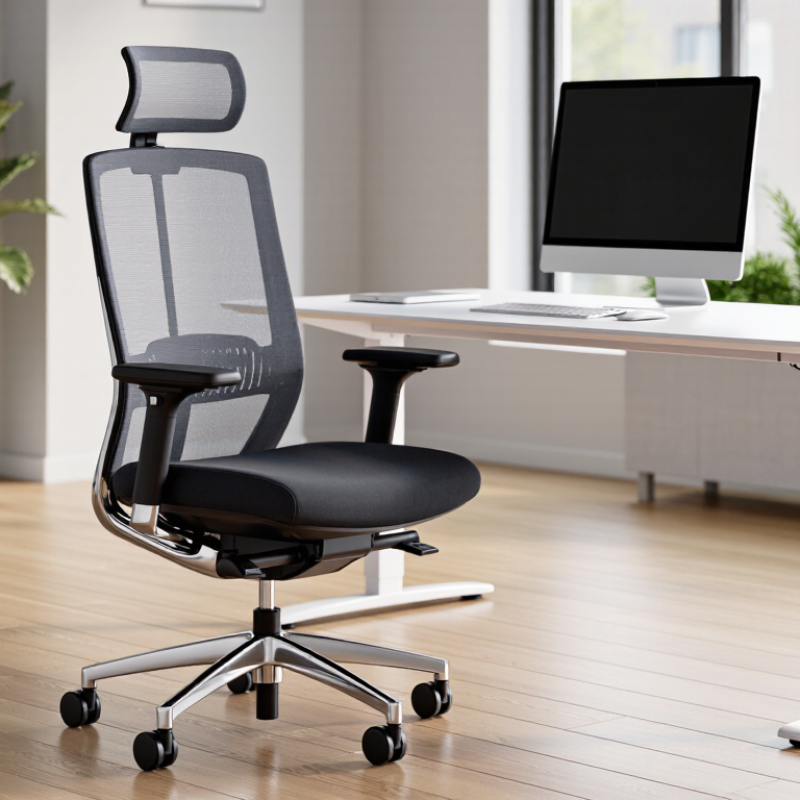
How to Choose the Best High Backed Office Chair?

Define High-Back Chair Needs Using OSHA Ergonomic Guidance

OSHA ergonomic guidance does not require a high-backed chair. It emphasizes fitting the workstation to the person and supporting a neutral, comfortable posture. A taller back may help support the upper back during reclined tasks, but it cannot fix a seat that is too deep or a desk set too high. Fit matters more than height.

Adjust the chair so your feet rest flat, your thighs are supported, and a small gap remains behind your knees. Set the backrest to support your lower back without pushing you forward. Keep shoulders relaxed and elbows near your sides. Try the chair at your actual desk; a showroom adjustment may feel different after an hour. Even a well-fitted chair does not replace movement.

Tips: Test the seat depth and recline before choosing. Check whether the armrests let you get close to the desk. If your feet dangle, use a footrest. OSHA’s workstation guidance is practical, not a product-rating system. One detail is easy to miss: people shift throughout the day, so leave room to change position.

Check Seat Fit: Keep Feet Flat and Thighs Parallel, per OSHA

A high-backed office chair should fit your body from the seat upward. OSHA workstation guidance advises keeping your feet supported and your thighs roughly parallel to the floor. Sit back against the chair, then check whether your feet rest flat without stretching. Your knees should bend comfortably, with no pressure from the seat edge behind them. Small details matter.

If your feet dangle, lower the chair or use a stable footrest. If the seat presses into your thighs, try a chair with adjustable seat depth. A high back cannot correct a poorly fitted seat. It is easy to focus on lumbar support and overlook your legs. Check the fit while seated at your usual desk, wearing the shoes you normally work in. Notice whether your shoulders stay relaxed and your weight feels evenly supported. A quick test may miss discomfort that appears later, so reassess after a normal work session.

How to Choose the Best High-Backed Office Chair: Check Your Seat Fit

OSHA’s workstation guidance recommends keeping your feet flat on the floor and your thighs approximately parallel to it. The chart translates those positions into reference geometry: thighs at 0° from horizontal and lower legs at about 90° to the floor. These angles illustrate the posture; they are not precise OSHA chair-adjustment specifications. Adjust the seat height so your feet rest flat and your thighs are supported comfortably.

Assess Lumbar Support, Recline, and Armrest Adjustability

How to Choose the Best High Backed Office Chair?

A high back can support your shoulders, but height alone does not guarantee comfort. Check whether the lumbar area meets the curve of your lower back without pushing it forward. Sit with both feet flat and your thighs supported, then notice any pressure near your belt line. Small gaps matter. If possible, test the chair for at least ten minutes; a quick sit may hide discomfort.

Recline should move smoothly and provide enough resistance to keep you supported while typing. A lockable upright position can help during focused work, while a relaxed tilt can suit reading breaks. Armrests should adjust to your desk and your body. Set them so your shoulders stay relaxed and your elbows rest near a right angle. Armrests that are too high can lift your shoulders; ones that are too wide may pull your arms outward. Fit takes tinkering.

Tips: Adjust one feature at a time, then sit through a short work session. Note any pressure points. Comfort is personal, and even a well-adjusted chair may need another tweak after a few days.

Verify Safety and Durability Against ANSI/BIFMA X5.1-2017

How to Choose the Best High Backed Office Chair?

A high back can feel reassuring, but height alone does not prove safety or durability. Check whether the exact chair configuration was tested to ANSI/BIFMA X5.1-2017. The standard evaluates general-purpose office chairs through defined stability, strength, and durability procedures, including repeated-use tests. Ask for the complete test report, not just a label. Match its model, base, arms, and adjustments to the chair in front of you. Small differences matter.

The U.S. Bureau of Labor Statistics recorded 272,780 musculoskeletal-disorder cases involving days away from work across private industry in 2018. That figure is not specific to office chairs, and a tested chair cannot prevent every injury. Still, it is a useful reminder to assess fit as well as construction. Sit back and check whether the lumbar area meets your lower back. Your feet should rest flat, and the seat edge should not press behind your knees. Comfort is personal. It can be overlooked.

Treat the standard as evidence of tested performance, not a promise of perfect service life. Look for the report date, test laboratory, and stated user-weight limits. Inspect the chair’s joints, casters, and adjustment controls; they should move smoothly, without looseness or sharp noises. If the seller cannot identify the tested configuration, pause before buying. A glossy finish tells you little.

How to Choose the Best High-Backed Office Chair: Verify Safety and Durability Against ANSI/BIFMA X5.1-2017
Evaluation Dimension What to Verify Evidence or Measurement How to Interpret the Result
Standard applicability Confirm that the chair is represented as general-purpose office seating evaluated to ANSI/BIFMA X5.1-2017. Request a test report or declaration identifying the standard edition, chair model, and tests performed. A reference to the standard alone is not proof that a specific chair passed. Check that the documentation matches the chair being considered.
Stability Check whether the applicable stability tests were performed on the complete chair configuration. Review the test report for the relevant stability procedures and recorded pass/fail results. Stability performance is assessed through prescribed test methods; do not substitute a visual inspection or an unsupported “tip-proof” claim.
Seat and back strength Verify that applicable strength tests cover the seat and backrest structure. Look for test results covering the chair’s seat and back components, including the high-back configuration where applicable. The standard evaluates seating performance using defined procedures. A tall backrest by itself does not indicate greater strength or compliance.
Durability under repeated use Check the report for applicable durability tests on the seat, back, and other relevant chair components. Confirm that the report identifies the tested configuration, applicable procedures, and outcome. Use the standard’s applicable test results rather than assuming that fabric type, padding thickness, or a “heavy-duty” description proves durability.
Arms and other attachments If the chair has arms or other attachments, verify that the applicable tests include those parts. Compare the tested configuration and component list with the chair’s actual options. Test coverage can depend on configuration. A report for a chair without arms may not substantiate claims about an optional arm assembly.
Base, legs, and casters Confirm that the base and mobility components are included in the applicable safety and performance evaluation. Check the report for the chair base and caster or glide configuration used in testing. Verify that the delivered configuration matches the tested one; different components may affect performance.
Adjustment mechanisms Check applicable tests for the chair’s adjustment features, such as seat-height or tilt mechanisms, if fitted. Request documentation that identifies the mechanisms and test outcomes for the relevant configuration. Do not assume every optional mechanism is covered by a report for a simpler chair configuration.
Fit for the intended user Measure seat height, seat width, seat depth, backrest height, and armrest clearance; compare them with the user’s needs. Record dimensions in inches or millimeters and test the chair in person when possible. These are buyer fit checks, not a substitute for ANSI/BIFMA compliance. The standard does not make every chair suitable for every body size or workstation.
High-back support and comfort Assess whether the backrest supports the user comfortably and whether its shape and any headrest suit the intended posture. Check the product dimensions and try the chair through the intended range of sitting positions. “High-backed” is a design description, not by itself a safety, durability, or ergonomic certification.
Documentation and traceability Match the report or declaration to the exact chair model, options, and standard edition. Check the document date, model identification, test scope, and stated results; ask for clarification if any are missing. Prefer specific, verifiable documentation over a generic claim of compliance. ANSI/BIFMA X5.1-2017 is a test standard, not a guarantee of comfort or service life.

Note: Test procedures and acceptance criteria depend on the applicable provisions of ANSI/BIFMA X5.1-2017 and the chair configuration. Verify requirements and results in the relevant test documentation rather than inferring certification from product descriptions.

Compare Upholstery, Warranty, and Total Cost of Ownership

How to Choose the Best High Backed Office Chair?

Compare upholstery, warranty, and total cost of ownership—not just the sticker price. A 2019 JAMA analysis estimated that U.S. adults spent about 6.4 hours a day sitting. For a chair used through long workdays, fabric choice matters: tightly woven upholstery can feel breathable, while coated surfaces are easier to wipe after spills. Check seams, foam support, and cleaning instructions in person. A soft seat may feel impressive for five minutes. That is not enough.

Read warranty terms closely. A longer warranty can reduce repair risk, but coverage may exclude fabric wear, foam compression, or damage from cleaning products. Compare the warranty period for each part, and ask how replacement parts are obtained. For total cost, add the purchase price, expected repairs, cleaning supplies, and likely replacement cost over several years. Divide that estimate by the years of expected use. The result is a rough annual cost, not a promise; real wear varies with body weight, hours, and care.

Tips: Test the chair for at least ten minutes, and notice pressure behind your knees and heat against your back. Price a fabric-cleaning service before buying light upholstery. Keep the warranty document, too. Small detail, often forgotten. I would still treat online reviews cautiously: a comfortable first week does not prove a chair will hold its shape after years of daily use.